AI Integration in Existing Software: 4 Paths for Legacy

AI integration in existing software is now the fastest way for established businesses to get real value from artificial intelligence without throwing away the systems that already run their operations. Your ERP, CRM, billing platform, or custom line-of-business app may be ten or twenty years old, but it holds something no new tool can match: years of business data and proven workflows.
The pressure to act is real. McKinsey’s latest State of AI research shows that most organizations now use AI in at least one business function, and the share using it across three or more functions keeps rising. Yet the same research shows that only a minority see a clear impact on profit. The gap usually comes down to one thing: AI that sits beside the business instead of inside the systems where work actually happens.
This guide explains the four practical paths for adding AI to legacy business software, from a quick API connection to a full AI-native rebuild. You will learn what each path involves, when it fits, what it costs, the risks to watch for, and how to choose the right one for your business.
Why Legacy Software Struggles With AI
Legacy systems were built long before generative AI existed. They were designed to process transactions reliably, not to share data in real time with machine learning models. Here are the most common roadblocks.
Siloed and Messy Data
Customer records, inventory, and financial data often live in separate databases with different formats and IDs. AI models need clean, connected data to produce useful results.
No Modern APIs
Many older systems move data through flat files, batch jobs, or proprietary protocols. Without APIs, connecting an AI service becomes harder.
Batch Processing Instead of Real Time
Overnight batch updates work fine for reports, but they are too slow for fraud detection, live pricing, or instant customer support.
Undocumented Code and Skills Gaps
Critical business rules are often buried in old code that only a few people understand. Teams that know the legacy stack rarely know modern AI, and the other way around.
Security and Compliance Concerns
Sensitive data protected by outdated access controls must be handled carefully before any AI model touches it.
The good news is that none of these problems require a complete rewrite. The right integration path works around them.
The 4 Paths for AI Integration in Existing Software
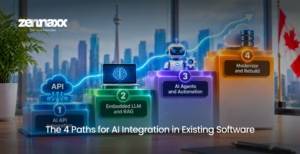
Think of these paths as a ladder. Each step adds more AI capability, but also more investment and change. Many businesses start on the first path and move up as they see results.
| Path | What It Means | Time to First Value | Investment | Risk |
| 1. AI API Integration | Connect external AI services to your app through APIs | 4 – 8 weeks | Low | Low |
| 2. Embedded LLM and RAG | Build AI into core workflows using your own data | 2 – 5 months | Medium | Moderate |
| 3. AI Agents and Automation | Add agents that take actions across systems | 3 – 6 months | Medium to high | Moderate |
| 4. Modernize and Rebuild | Re-architect parts of the system around AI | 9 – 18 months | High | Higher |
Path 1: AI API Integration (The Bolt-On Approach)
AI API integration is the fastest and lowest-risk way to start. Your existing application stays the same, and a thin integration layer calls external AI services when needed.
How It Works
- A small middleware service or API wrapper sits between your legacy app and the AI provider.
- The app sends a request, such as a document, an email, or a customer question.
- The AI service returns a result, such as a summary, classification, translation, or draft reply.
- The result appears inside the screens your team already uses.
Best Use Cases
- Summarizing long records, tickets, or contracts
- Classifying and routing emails and support requests
- Extracting data from invoices, receipts, and forms
- Generating draft responses, product descriptions, or reports
- Adding AI copilots that assist users without changing core logic
Pros and Cons
- Pros: Quick to launch, low cost, easy to reverse, minimal disruption
- Cons: Limited access to deep business context, dependence on third-party providers, less control over data flow
This path is ideal for proving value quickly and building internal confidence before bigger investments.
Path 2: Embedded LLM and RAG (The Smart Integration Approach)
The second path goes deeper. Instead of calling AI from the outside, you integrate LLM into existing application workflows and connect it to your own business knowledge.
What RAG Means for Business Software
Retrieval-augmented generation (RAG) lets a language model look up relevant information from your company data before it answers. Your documents, policies, product catalogues, and database records are indexed in a vector database. When a user asks a question, the system finds the most relevant content and feeds it to the model, so answers are accurate and specific to your business.
RAG for business software solves one of the biggest problems with generative AI: generic or made-up answers. It keeps responses grounded in your real data.
Best Use Cases
- Internal knowledge assistants for staff
- Smart search across contracts, manuals, and records
- Customer support assistants that use your policies and order data
- Sales tools that pull pricing, inventory, and customer history
- Compliance assistants that check documents against internal rules
What It Takes
- Clean, well-organized data sources
- A vector database and data pipelines that keep content up to date
- Access controls so users only see the data they are allowed to see
- Evaluation tools to test answer quality before and after launch
Pros and Cons
- Pros: Answers based on your real data, strong user value, works with existing systems
- Cons: Requires data preparation, ongoing tuning, and quality monitoring
Path 3: AI Agents and Intelligent Automation
The third path moves from AI that answers to AI that acts. Agentic AI systems can plan steps, use tools, and complete tasks across multiple systems, often with a human approving key decisions.
How Agents Work With Legacy Systems
- Agents connect to your systems through APIs, database access, or, where no API exists, robotic process automation (RPA) that operates legacy screens.
- They read information, make decisions based on rules and AI reasoning, and take actions such as updating records, creating orders, or sending notifications.
- Guardrails, approval steps, and audit logs keep their actions safe and traceable.
Best Use Cases
- Processing invoices from inbox to accounting entry
- Handling order changes, returns, and refunds
- Reconciling data between systems
- Onboarding customers or employees across several tools
- Monitoring inventory and creating purchase requests automatically
McKinsey’s research shows that use of AI agents is rising, especially among large enterprises. To explore this approach in more depth, see our guide to AI agent development.
Pros and Cons
- Pros: Real time savings, automation of multi-step work, works even with older systems
- Cons: Needs strong guardrails, careful permissions, and ongoing monitoring
Path 4: Modernize and Rebuild Around AI
Sometimes the legacy system itself is the problem. If the code is too fragile, the data layer is unusable, or the platform cannot scale, adding AI on top only creates more technical debt. In these cases, modernization comes first.
Common Modernization Approaches
- Strangler pattern: Gradually replace parts of the old system with new services while the rest keeps running.
- Refactoring: Clean up and restructure code that blocks integration.
- Replatforming: Move the system to modern cloud infrastructure that supports AI workloads.
- Re-architecting: Rebuild key modules around APIs, event-driven data, and AI services.
This is where legacy software modernization services deliver the most value. Modernization does not have to mean a risky “big bang” rewrite. A phased approach keeps your business running while each module is upgraded.
When This Path Makes Sense
- The system is no longer supported by its vendor
- Maintenance costs keep rising every year
- The data layer needs to be rebuilt anyway
- You want AI to become a core part of your product, not an add-on
For some businesses, a partial modernization combined with Path 2 or Path 3 delivers the best balance. For others, starting fresh makes more sense. If that is your situation, our guide on building AI software from scratch walks through the process.
How to Choose the Right Path for AI Integration in Existing Software
Use these questions to guide your decision:
- What problem are you solving? Start with a clear business goal, such as faster support, less manual data entry, or better forecasting.
- How accessible is your data? Clean, connected data opens up Paths 2 and 3. Messy data may require modernization first.
- Does your system have APIs? If yes, Paths 1 and 2 are easier. If not, RPA or an API wrapper may be needed.
- How fast do you need results? Path 1 delivers in weeks. Paths 2 and 3 take months. Path 4 takes longer.
- What is your risk tolerance? Start small if your core system cannot afford downtime.
- What is your long-term vision? If AI will become central to your product, plan for Path 4 over time.
A Practical Starting Point
Most businesses get the best results by starting with one high-value use case on Path 1 or Path 2, measuring results, and then expanding. This builds trust, proves ROI, and reveals what the next step should be.
Step-by-Step AI Integration Roadmap
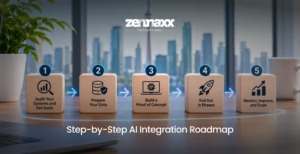
Whichever path you choose, this roadmap keeps the project on track.
1. Audit Your Systems and Set Goals
Map your applications, data sources, integrations, and owners. Pick two or three use cases tied to measurable business outcomes.
2. Prepare Your Data
Clean, match, and organize the data the AI will use. Set access rules and make sure sensitive information is protected.
3. Build a Proof of Concept
Test one use case with real data. Run it in “shadow mode” alongside the current process so you can compare results without risk.
4. Roll Out in Phases
Launch to one team, department, or region first. Keep the old process available and have a rollback plan ready.
5. Monitor, Improve, and Scale
Track accuracy, speed, cost, and user feedback. Use MLOps practices to monitor models, retrain them with fresh data, and expand to new use cases.
Security, Compliance, and AI Governance
Adding AI to business software means new risks. Strong AI governance protects your data, customers, and reputation.
- Protect sensitive data: Mask or remove personal and confidential information before sending it to external models.
- Control access: Make sure AI tools respect the same permissions as your existing system.
- Choose the right deployment: Use private cloud or self-hosted models when data cannot leave your environment.
- Keep humans in the loop: Require approval for high-impact actions taken by AI agents.
- Log everything: Keep audit trails of prompts, outputs, and actions for compliance and troubleshooting.
- Defend against new threats: Prompt injection, data leakage, and insecure outputs are real risks. The OWASP Top 10 for LLM Applications is a useful checklist for securing AI features.
- Avoid vendor lock-in: Design your integration so you can switch AI models or providers later.
How Much Does AI Integration Cost?
Cost depends on the path, the number of systems, data quality, security requirements, and the AI models you use. The ranges below are typical market estimates.
| Path | Estimated Cost (CAD) | Typical Timeline |
| AI API Integration | $15,000 – $50,000 | 4 – 8 weeks |
| Embedded LLM and RAG | $40,000 – $150,000 | 2 – 5 months |
| AI Agents and Automation | $50,000 – $200,000 | 3 – 6 months |
| Modernize and Rebuild | $150,000 – $500,000+ | 9 – 18 months |
Remember to budget for ongoing costs too, such as AI model usage fees, hosting, monitoring, and maintenance. If your system needs deeper upgrades, our guide on legacy software modernization cost explains what drives the budget.
Common Mistakes to Avoid
- Starting with technology instead of a business problem: AI should solve a clear, measurable need.
- Ignoring data quality: Poor data leads to poor AI results, no matter how advanced the model.
- Skipping the pilot: Testing on real workflows reveals issues before they reach customers.
- Launching without evaluation: Without a way to measure answer quality, problems go unnoticed.
- Forgetting the people side: Train users, explain how AI helps them, and gather feedback early.
- Over-customizing too soon: Start simple and expand once you know what works.
Why Partner With Zennaxx for AI Integration
Zennaxx is a trusted software modernization company and AI machine learning development company that helps businesses bring AI into the systems they already rely on.
Our team combines deep legacy expertise with modern AI skills, so we can work with older codebases while building secure, scalable AI features. Through our software modernization development services and machine learning app development services, we offer:
- AI readiness assessments and integration roadmaps
- AI API integration with leading model providers
- LLM and RAG solutions built on your business data
- AI agents and intelligent workflow automation
- Legacy code refactoring, API enablement, and cloud migration
- Custom machine learning models for forecasting, detection, and recommendations
- Security, governance, and ongoing MLOps support
Whether you want a quick AI win or a long-term modernization plan, we help you choose the right path and deliver it without disrupting your business.
Final Thoughts
Legacy software is not a barrier to AI. It is often your biggest advantage, because it holds the data and workflows that make AI genuinely useful. Whether you start with a simple API connection, build smart assistants with RAG, deploy AI agents, or modernize your platform step by step, the key is to choose a path that matches your goals, data, and risk tolerance.
The right partner makes all the difference. Ready to unlock the value hidden in your current systems? Talk to the Zennaxx team today for a free consultation and a clear roadmap for AI integration in existing software.
Frequently Asked Questions
Can AI be added to legacy software without replacing it?
Yes. APIs, middleware, RAG, and AI agents can add AI features to existing systems while the core software keeps running. A full rebuild is only needed when the system cannot support integration.
What is the easiest way to integrate AI into an existing application?
AI API integration is usually the easiest. A small integration layer connects your app to an AI service for tasks like summarization, classification, or document extraction.
What is RAG and why does it matter for business software?
RAG (retrieval-augmented generation) lets an AI model search your company data before answering. It makes responses more accurate, up to date, and specific to your business.
How long does AI integration take?
A simple API integration can deliver results in 4 to 8 weeks. RAG and agent projects usually take 2 to 6 months, while modernization and rebuilds can take 9 to 18 months.
Is it safe to connect AI to systems with sensitive data?
Yes, with the right controls. Data masking, access permissions, private model hosting, audit logs, and human approval steps keep sensitive data protected.