Flutter has become the go-to framework for building cross-platform apps from a single codebase. It’s fast, flexible, and continues to evolve to solve real developer needs.
Flutter 3.38 just dropped with many new updates that really speed up your development cycle and keep your apps compatible. These are more than incremental tweaks.
Developers call dot shorthand a “big long-term difference” for large codebases. Widget previews now mimic web dev feedback loops, so you can iterate without full rebuilds. Moreover, smoother Android transitions make apps feel polished right from the start.
In this blog, we highlight the major Flutter updates that truly change the workflow of a Flutter app development company in Canada.
New Flutter Updates You Must Know
Developers everywhere are praising Flutter’s unmatched multi-platform speed with new updates. New updates can drastically reduce the time it takes for web app development services.
Here’s everything you need to know about the upgrade.
Dart 3.10 + Dot Shorthands
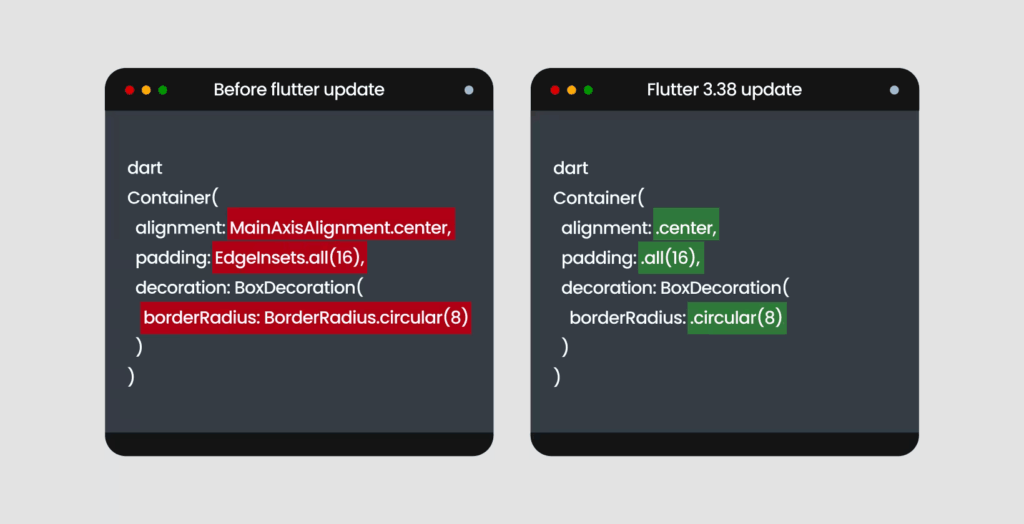
The most distinctive feature of the latest upgrade is dot shorthand syntax. Instead of the verbose MainAxisAlignment.start, you can simply write .start. Same for EdgeInsets.all(12); it’s now just .all(12).
This is not just about saving keystrokes. For complex layouts with nested widgets, the repetitive boilerplate makes code harder to scan, and typos slip through. Now, the compiler infers the type from context, so you get full type safety without verbosity.
So, before the code would be:
dart
Container(
alignment: MainAxisAlignment.center,
padding: EdgeInsets.all(16),
decoration: BoxDecoration(
borderRadius: BorderRadius.circular(8)
)
)
Now, with the Flutter 3.38 update, it will be:
dart
Container(
alignment: .center,
padding: .all(16),
decoration: BoxDecoration(
borderRadius: .circular(8)
)
)
Shorthand makes code easily readable, and code reviews become much smoother.
Material 3 as the Default
New projects by FlutterApp development services in Canada adopt Material 3 automatically with “useMaterial3: true” as default. Out of the box, you get dynamic color schemes, updated components, refined elevation, and the full Material 3 design system.
Typography moves to a more balanced scale, and colors use seed-based schemes to automatically generate consistent light and dark themes. You can pick one seed color, and Material 3 generates an entire palette that works harmoniously across your app.
Buttons, navigation bars, cards, and dialogs look and feel different now. In addition, the elevation system also got an upgrade. Instead of hard shadows, Material 3 uses surface tint overlays: as surfaces rise in z-space, they get lighter. This subtle depth works better across light and dark themes.
Framework & UI Enhancements
Refinements in the rendering pipeline now make animations smoother, and the output of frames becomes more predictable. Web builds benefit from cleaner rendering paths with reduced layout shifts. Your code can maintain consistent animation performance across browsers.
Live browser previews are now available with the widget previewer. Point it at a browser tab, edit your code, and watch the UI update in real-time without a full rebuild. This is huge for testing responsive layouts.
API Improvements
Some of the major upgrades for API are:
- Badge.count(maxCount: …): It offers better number handling. You can cap the value and auto-display “99+” without writing extra logic.
- InkWell.onLongPressUp: This new gesture capability fires a new callback when the user releases after a long press. This gives finer control over gesture flows.
- Cupertino updates: Cupertino Sliding Segmented Control now supports Momentary for controls that shouldn’t hold state. Refreshed CupertinoSheet adds a stretch effect that mirrors native iOS behavior.
Major Web Development Updates
Web development also got a serious upgrade.
New web_dev_config.yaml
A single web_dev_config.yaml now handles host, port, SSL certificates, headers, and proxy rules. The days of hunting through command-line flags or fighting with disparate setups across team machines are over.
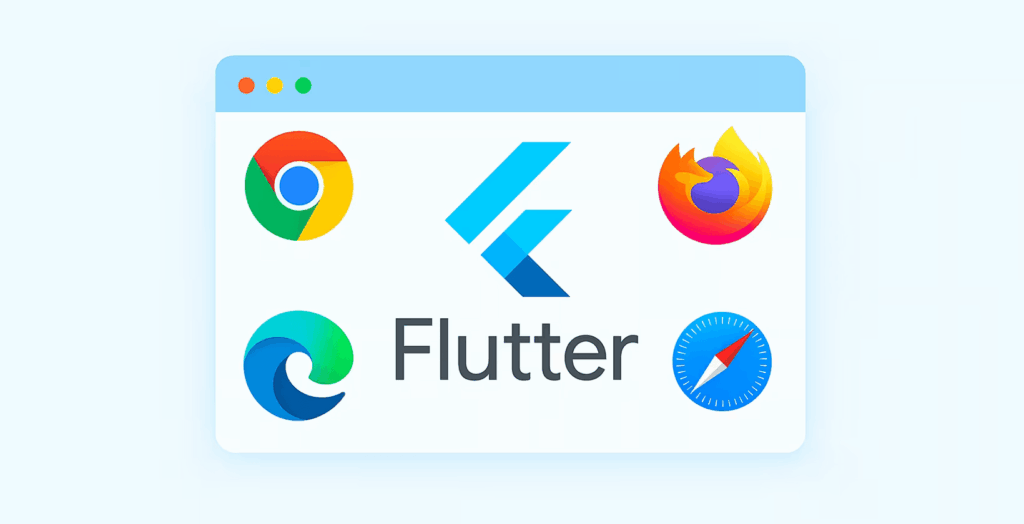
Multi-Browser Hot Reload
Previously, you had to manually refresh each browser window and lose state with every refresh. Now, hot reloading works across multiple browsers. Have Chrome, Firefox, and Safari open, make a change, and see it update everywhere without losing state. When testing responsive layouts or browser-specific bugs, this cuts iteration time dramatically.
IDE Integration
The latest widget previewer has tighter IDE integration. Pop open a preview in VS code or Android Studio and see widgets render without spinning up the full app. Those seconds add up during sprints.
Platform Support & Readiness
With new updates, Flutter is set to remain as a platform of choice for both iOS and Android developers.
iOS / macOS
Full support for iOS 26 and Xcode 26 is now available with Flutter iOS app development software. Flutter supports the new mandatory UIScene life cycle for compliance with iOS 26. It replaces the older UIWindow-based life cycle. Apps that use platform channels in interaction with the window hierarchy or custom view controllers have their respective components updated. Most applications with standard flutter patterns don’t need significant changes.
Android
The new update prepares Android app development service for Android 15’s 16KB page size. The recommended configuration is minimum Java 17 and NDK r28. This update is important because a majority of Android devices run with 4KB pages today. Apps compiled to run on 4KB pages will not run on those configured with 16KB pages.
Now, if your app uses native libraries or plugins with .so files, verify they are built with 16KB page alignment. Run flutter build apk –target-platform android-arm64 and test on a 16 KB page emulator before November.
Key Breaking Changes
There are 4 major breaking changes:
- Wide-gamut Cupertino colours now use float-based accessors (r/g/b/a). So, Old getters and withOpacity() behave differently. Move to withValues().
- OverlayPortal.targetsRootOverlay is deprecated. Use overlayLocation instead. This affects tooltips, menus, and custom floating UI.
- Semantics focus flags are also deprecated. Focus-related properties like SemanticsProperties.focusable are gone. Update your custom focus management code accordingly.
- Strongly supports both Swift and Objective-C
Performance Improvements
Flutter 3.38 improves frame output across Skia and Impeller and removes a leak linked to activity teardown. Cleaner pipelines and fixes in RenderWebImag reduce layout shifts for steady web builds. Now, the UI behavior can be more predictable across mobile and web targets.
Overlay and Advanced UI Enhancements
New OverlayPortal.overlayChildLayoutBuilder gives developers a stable way to place floating UI above the widget tree. It suits well for app-wide alerts, banners, or global controls without layout hacks for more dynamic and polished user experiences.
Accessibility Updates
Wider semantics support and fixes, and improved screen-reader behaviour, provide better accessibility previews across devices.
Practical Impact on Real Projects
Developers can expect the following improvements in their app and web development:
- Faster Development: Dot Shorthand, quicker previews, and better tooling reduce boilerplate and speed up UI iterations.
- Multi-platform readiness: Compatibility with Android 15 and iOS 26 keeps your app current with upcoming OS versions.
- Stronger Web Builds: Rendering fixes and configuration updates improve the reliability of web builds.
- Better End-User Experience: Improved animations and styling consistency reduce glitches and give a polished experience for the users.
When to Upgrade Carefully
Upgrading becomes important if
- You depend on deprecated APIs
- Your plugins might not support Dart 3.10 yet
- You’re targeting multiple platforms
- Your Android setup needs Java 17 and NDK r28 updates
Some developers report that hot-reload is sluggish with animations. For some, iOS runs hang on devices and crash occasionally during debugging. Web and desktop targets seem to have more issues than mobile.
When you make the choice to upgrade, do so carefully. Best practices are:
- Create a branch specifically for the upgrade
- Run flutter pub outdated to check for plugin compatibility
- Update Android components: Gradle, Java, NDK
- Fully test the app, including UI, accessibility, and cross-platform builds
How Zennaxx Can Help

At Zennaxx, a well-known company for Flutter app development services in Canada, we develop Flutter applications that stay stable across platforms, evolving smoothly with your growing product. We prioritize long-term reliability, clear architecture, and support so that you can upgrade to a newer version without disruption. Hire Flutter developers Zennaxx to:
- Upgrade with confidence: Our engineers take care of every Flutter 3.38 change to keep your app compatible with iOS 26, Android 15, and Dart 3.10, while protecting the core features.
- Reduce platform inconsistencies: We test extensively across Android, iOS, web, and desktop apps to keep your UI and interactions consistent on every device.
- Boost app performance: We ensure that your app runs smoother, uses memory more effectively, and runs without rendering issues.
- Build a Strong foundation: We set up architecture that reduces rework in the future, so your team can ship new features faster.
FAQs
-
- Should I use Flutter 3.38 for new projects?
-
- Will upgrading to Flutter 3.38 change my app size?
-
- Do I need to change the code in every project?
-
- Will my UI look different with Material 3?
-
- Should I upgrade if I target web and mobile?